
My first infographic competition.
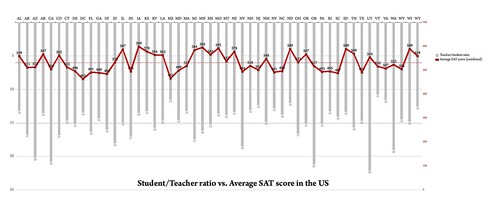
(click on infographic to enlarge)
I’ve come across a wealth of fantastic infographics blogs recently. One of the best, and which has a community element is Flowing Data maintained by Nathan Yau, an UCLA PhD candidate. Nathan runs regular Visualize This competitions, the latest of which (closes 24 November 2009) compares teacher/student ratio with SAT scores by State.
The hardest bit, I’ve found, of creating an infographic is (perhaps obviously) working out how to visualize the data in a meaningful way. The problem with the raw data presented in this competition was that there were 3 SAT scores (reading, maths, writing) and that a meaningful correlation would assume an inverse relationship between this and teacher/student ratio.
In other words I had to figure out a way of plotting something increasing whilst the other decreased.
After a bit of playing around fruitlessly, I settled on the infographic at the top of this post. I’ve a few days left to change it a bit if necessary, but I think that it does, on the whole, do what’s required of it.
I’m never going to win the competition (a copy of David McCandless’ The Visual Miscellaneum) but, like entering a half-marathon or a 5k to focus your running routine, it’s still worth doing! 😀

I like the idea of presenting the data using the combination of bars/line. Just one thought: putting it in order of state makes it difficult to spot a trend. How would it look if you displayed it in order of teacher ratios (lowest to highest)? I imagine that we could see a clear trend in the attainment/SATs if it’s ordered that way.
Great idea! Might try that. :-)