
Functionally and aesthetically-speaking: Asus Eee 1000 vs. Advent 4211
Disclaimer: I was approached by a representative of Test Freaks looking to advertise on this site. As I’m trying to keep this blog ad-free, I declined. However, exploring the site I found it to be genuinely useful, collating reviews, pictures and videos – and therefore one I’d recommend to readers of dougbelshaw.com 😀
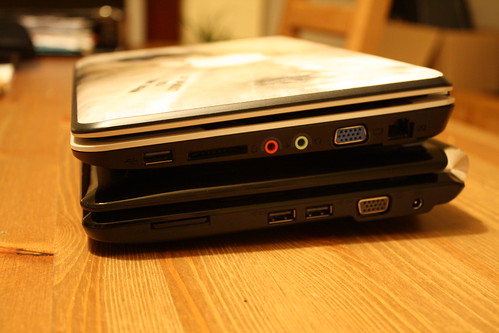
Earlier this week I took delivery of six Asus Eee 1000 netbooks at school. I used part (OK, most) of my E-Learning Staff Tutor budget to buy them and opted for the Linux-powered black 40GB SSD version for robustness. I own, and use at in my teaching, an Advent 4211 which is essentially a clone of the MSI Wind. I’ve ‘pimped’ this somewhat, upgrading the RAM, purchasing a ‘high-capacity’ battery, adding a 802.11n wireless card, and installing Mac OS X (guide here).
Despite running different operating systems, the two devices are similar. Both are dark-coloured with 10-inch screens and are physically similar in size. Both have Bluetooth. With the extended battery, the Advent weighs about the same as the Asus. Looking at the Test Freaks website, both devices (at the time of writing) have an average score of 9.8 out of 10:
Although the Advent is £280 to the Asus’ £320 (including VAT), I’ve spent more than the differential on the upgrades I’ve made. The Asus Eee 1000 comes with 802.11n wireless networking and up to a 7-hour battery as standard, whereas I’ve had to add to the Advent to get it up to this standard.
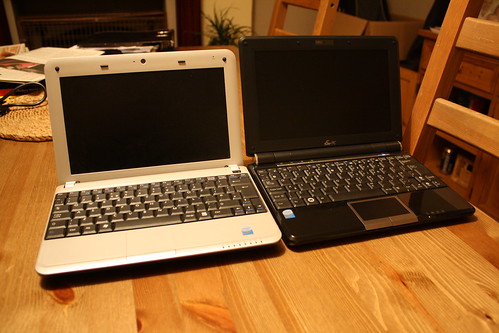
So far, neck and neck. I’ve got the option of using either in my everyday role. Which would I choose and recommend? It’s difficult, but I’d go with the Asus Eee 1000. Why? Because it’s high-spec (for a netbook) out-of-the-box, it’s sleek and glossy, has a wonderful battery life and comes with a case.
Wait until after Christmas so they’re widely available under the £300 mark and get yourself one! :-p
Related articles by Zemanta
- Asus Eee PC 1000H: some pros, some cons
- Asus Eee PC 1000 10in Linux netbook
- Netbook weigh-in: MSI Wind vs. Asus Eee PC 1000H
![Reblog this post [with Zemanta]](http://img.zemanta.com/reblog_e.png?x-id=135063e6-e640-4711-a127-12d3b9c80bb2)

OK, so they’re cool-looking, light, don’t come bloated with software, and (relatively) cheap. I want one! But… where would I use it? At home? Keyboard and screen are kinda small, and my eyesight ain’t getting no better (like my grammar). At work? Can’t just bring along any ole laptop and plug into the LAN: need special forms, special permission and wait two weeks, and then the answers’ “no!” So, where? Wifi? How you use it, Doug?
I’ve got an officially unoffical wireless network in my room. That is,
the school know about it, but don’t support it. As a consequence, I
use my own personal netbook for registers, admin, Google Docs and
checking stuff, and my school laptop to run my interactive whiteboard.
I’ve tried to not be the main event in my classroom, so have ‘islands’
of tables, my desk at the back of the classroom, a standard whiteboard
on one wall, and the interactive whiteboard on another. Having a
netbook means I can show students their progress, what they need to
catch up on, etc.
The 6 netbooks I’ve bought with my E-Learning tutor budget are going
to be used to support learning in the classroom. Naturally, I’m
trialling them in my classroom first by using them with groups of
students before I produce a guide on how to use them. When I do that,
I’ll put it on the elearnr website: http://elearnr.edublogs.org :-)
OK, so they're cool-looking, light, don't come bloated with software, and (relatively) cheap. I want one! But… where would I use it? At home? Keyboard and screen are kinda small, and my eyesight ain't getting no better (like my grammar). At work? Can't just bring along any ole laptop and plug into the LAN: need special forms, special permission and wait two weeks, and then the answers' “no!” So, where? Wifi? How you use it, Doug?
I've got an officially unoffical wireless network in my room. That is,the school know about it, but don't support it. As a consequence, Iuse my own personal netbook for registers, admin, Google Docs andchecking stuff, and my school laptop to run my interactive whiteboard.I've tried to not be the main event in my classroom, so have 'islands'of tables, my desk at the back of the classroom, a standard whiteboardon one wall, and the interactive whiteboard on another. Having anetbook means I can show students their progress, what they need tocatch up on, etc.The 6 netbooks I've bought with my E-Learning tutor budget are goingto be used to support learning in the classroom. Naturally, I'mtrialling them in my classroom first by using them with groups ofstudents before I produce a guide on how to use them. When I do that,I'll put it on the elearnr website: http://elearnr.edublogs.org 🙂
http://www.engadget.com/2008/12/05/qualcomm-shows-off-snapdragon-based-netbook-tablet-concept/
http://www.engadget.com/2008/12/05/qualcomm-sho…