
Using Joe’s Goals to track and then improve your productive outputs.
In keeping with yesterday’s post about actually using tools before recommending them, I’d like to introduce you to Joe’s Goals. As with all the best productivity tools, it’s really very simple and straightforward. It looks like this:
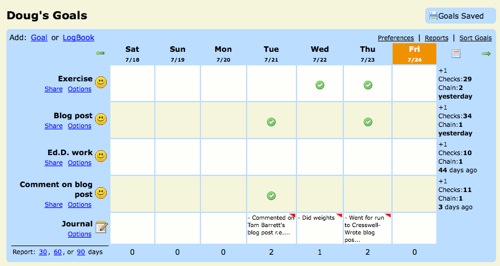
As you can see, I’ve specified my ‘goals’ down the left-hand side and the days of the week appear along the top (along with the date). If you complete your goal on a particular day, clicking on the relevant box fills it with a green ‘tick’ icon. There’s also the option to have a ‘journal’ entry box which you can see at the bottom of the above screenshot.
I’ve been using Joe’s Goals for a few months now and have found it very useful. The satisfaction and motivation element of being able to ‘tick off’ that I’ve completed a target I’ve set myself is very worthwhile. There’s three main benefits as far as I see it for using Joe’s Goals are that you can:
- Track what you’ve been up to in order to see what you did when.
- Monitor trends (e.g. I’m statistically more likely to write a blog post if I’ve been for a run that morning)
- Motivate yourself to do something you haven’t done for a while (in my case, work on my Ed.D.!)
Have YOU tried out Joe’s Goals? What did you think? What are the alternatives? 😀
![Reblog this post [with Zemanta]](http://img.zemanta.com/reblog_e.png?x-id=7dae835c-be05-4832-977e-fdc3070e5260)

I must admit, I have not used this program but I have it bookmarked in delicious with a few others that increase productivity. Being a Toodledo subscriber (remember the milk replacement) I was in their forum and noticed a post about apps you use on a daily basis, too good to be true so I bookmarked the options, have a look for yourself.
http://www.toodledo.com/forums/4/97/0/apps-you-use-on-a-daily-basis.html
Just realized you might not be able to get into the toodledo forum unless you are a member. Here are the links to most of them.
http://www.rescuetime.com/
http://www.davidrm.com/thejournal/
http://www.joesgoals.com/
http://www.manictime.com/
http://bubbletimer.com/
http://gopingme.com/
leechblock — a Firefox addon that prevents me from reading blogs.
http://www.paymo.biz/
Could you use this as a simple ‘merit’ chart with a class? Add each pupils name as a goal and tick them off as they do something worthy of recognition? Might be nice to do with your Form Class for example.