
HOWTO: Make yourself more visible online by building a Google Profile
 I don’t know about you, but I’m never sure where to link to when I want people to know a bit more about me. For example, when emailing someone who might like to know who I am and where I’m coming from, do I link here, to my blog? To my Twitter stream? To my FriendFeed? Sometimes I just pick the one I think most appropriate, sometimes I hedge my bets and link to all of them!
Thankfully, I no longer have that problem. Why? I just link to my Google Profile! It’s very easy to do – simply visit http://www.google.com/profiles/ Here’s what mine looks like:
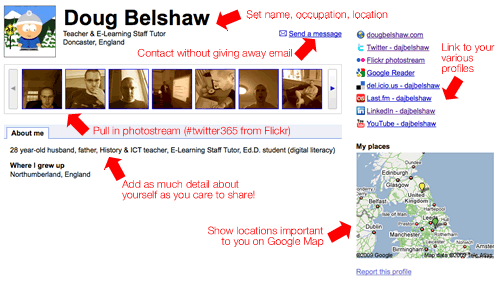
You should probably claim your preferred username (e.g. ‘dajbelshaw’) ASAP in case someone else claims it. Once you’ve got it, you can use your favourite URL-shortening site to make it even easier to remember and add wherever you wish – e.g.
http://bit.ly/dajbelshaw
I’ve already been contacted a couple of times via my Google Profile and really like the way it brings my accounts together into one, easily accessible place. I don’t think it will be long before typing ‘Doug Belshaw’ into Google will result in landing at my Google Profile. And, I reckon, that’s no bad thing… 😀
![Reblog this post [with Zemanta]](http://img.zemanta.com/reblog_e.png?x-id=249c9f66-9afd-4ca6-973c-5dcd1dd4891c)

Fantastic Doug, hadn’t spotted that. Am half way through setting mine up now…
Excellent! Glad to have been of help, Mark. :-)