RSS feed for dougbelshaw.com/blog

Posts Tagged ‘Mobile phone’

…and 5 reasons why I bought a Dell Streak again.

Welcome back!
Feel free to suggest topics for me to write about using the Suggestions? tab to the right or use Formspring to ask me random stuff. Check Doug's FAQ first!

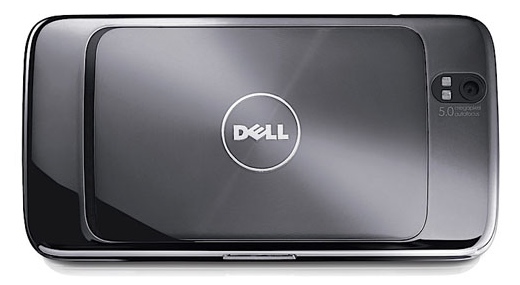
Last week I explained why I returned the Dell Streak I purchased on a 24-month contract. In this post I explain why I bought another yesterday on a device-only deal.


1. It’s more fun.

You can customise pretty much everything with the Android operating system. You have to resort to shenanigans to customise your message tone on the iPhone, whereas it’s trivial to get some great sounds on the Streak. There’s widgets and weird and wonderful stuff. :-)

2. The screen is just gorgeous.

Granted, I haven’t seen the screen on the iPhone 4 in the flesh, but the Dell Streak’s screen is so… well, touchable. The high-resolution screen is backed up by an extremely fast processor and enough memory to make flicking between apps easy.

3. The contract was part of the problem

Who wants the same phone after two years? I’m planning to wait until the earliest opportunity to get my Dell Streak unlocked and then go on an Orange SIM-only contract. Why Orange? It’s the only network that offers 3G where I live and my broadband is flaky due to our semi-rural location.

4. I’m online more than I talk

The default orientation of the Dell Streak’s screen is landscape. And that’s because it’s meant to be held like a PSP most of the time. It’s thin enough not to be heavy but substantial enough to feel solid in your hands. I like that.

5. The camera

The combination of large, hi-res screen, 5-megapixel camera and in-device editing functions feels luxurious, it really does.

There’s an active community for the Dell Streak over at http://streak.modaco.com and you should read this Techradar review which is both comprehensive and fair! :-D

Posted: June 15th, 2010
Categories: Technology
Tags: , , , ,
Comments: View Comments.

Why I no longer wear a watch.

CC BY-NC spengy

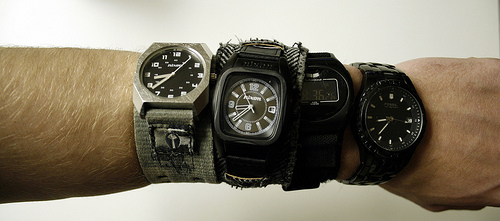
I remember fondly my first ‘proper’ watch: a digital Casio black-and-blue affair with a stopwatch. It was awesome. When I got older and a bit more style-conscious I requested a Seiko Kinetic for my 18th birthday. The Kinetic range had just come out and seduced me into thinking I’d never need to replace the battery in it. They were right, I didn’t. Instead, within two years the whole drive mechanism needed changing at a price not far away from the original purchase price of the whole watch. You never buy version one of anything, trust me. For my 21st birthday I received (at my request) another Seiko that looked very similar but used a good old battery. That’s the one I’ve still got but, as of January 1st, 2010, no longer wear.

I was at university when I got that watch, in my third and final year. During that year I had a lecturer for one of my Philosophy modules who would whip out his Sony Ericsson T68i every so often to look at the screen whilst he was lecturing. At the time I thought this was incredibly rude: how dare he be checking to see if he had any text messages whilst lecturing?! :-o

Later I became the proud owner of a T68i. It dawned on me that my lecturer didn’t wear a watch and, because the phone has the time in big, bold numbers as a screensaver, he had been merely checking what time it was so he didn’t run over. I forgave him post-hoc. ;-)

I’m always a bit worried about getting RSI, and so began to take my watch off automatically upon sitting down at my Macbook Pro after I noticing that taking my watch off whilst using it made my right wrist ache less.* But then I started to think… When I’m using my Macbook the time is displayed at the top-right of the screen; when I’ve got my iPhone on me (pretty much always) it displays the time on the lockscreen. Why am I wearing a watch at all?

The nail in the coffin for my watch, now cutting a forlorn figure on the kitchen table, was an article in WIRED magazine (to which I now subscribe). It too laughed at watches as an anachronism. Why on earth, it asked, when the time is all around us – including on personal devices that we carry everywhere – do we insist on wearing something that can only single-task? That was it, I decided I’d be watch-less in 2010.

Since then, I’ve found how liberating not knowing exactly what time it is can be. Yes, it’s necessary sometimes (when teaching, for example) but when in and around the house it certainly leads to more Flow experiences. And that’s a good thing. :-D

How about you? What else do we do or wear that could be considered anachronistic in this day-and-age?

* Yes, I (used to) wear my watch on my right wrist. No, I’m not left-handed. And no, I don’t know why I (used to) do this. I just always have done. :-s

Posted: January 26th, 2010
Categories: Productivity
Tags: , , , , , , , ,
Comments: View Comments.

10 ways to make your working day more productive

A lot of what makes people ‘productive’ is common-sense. But sometimes this needs spelling out, hence this post. I’m always looking for ways to be more productive. Please let me and fellow readers/subscribers know your tips and strategies in the comments.

Here’s some of my tips!

1. Don’t read emails

If you make the first thing you do in a day reading emails, you’re starting off the day on other people’s terms. Instead, achieve something from your own agenda first, then catch up on what people want to tell you! :-p

2. Read something inspirational

It might be the Bible, it might be some Marcus Aurelius, but make sure you read something (however short) – for a quick fix, try tivate.com!

3. Listen to podcasts

However you travel to work, podcasts are a great way to stop it being ‘dead time’. Audiobooks are also great (try Audible). Here’s the podcasts to which I subscribe:

4. Use an online to-do list

There’s lots of ways people will take money off you to ‘make you more productive’. I love Remember the Milk: it’s simple and free!

5. Share everything you do

If you share with other people, they’re a lot more likely to share with you. This, in turn, reduces your workload and increases your overall productivity. You can share things online through things like a wiki or a forum, or face-to-face.

6. Take pictures

I know very few people who haven’t got a camera built-in to their mobile phone. Instead of writing things out or trying to remember complex things, just snap it with your cameraphone! You could take this one step further if you’ve got an iPhone and use the wonderful Evernote for web-based synchronization. :-)

7. Make everything you can, digital

The problem with paper is that unless you photocopy it a copy exists in only one location – and can’t search and organize it. If you’re a teacher, make your markbook and attendance registers digital. Plan things using Google Calendar. These things might take some time to set up, but will pay dividends in the long-term.

8. Take breaks

Know your limits. You’re far better of having a 10-15 minute break and coming back to something with fresh(er) eyes and increased motivation than slogging away at an activity non-stop.

9. Drink coffee

Coffee is a stimulant: it contains caffeine. Drinking too much coffee isn’t good for you and can generate withdrawal symptoms. However, drinking a couple of cups per day of good filter coffee increases alertness and attention. I tend to have one in the morning with breakfast and one when I come home from work. You could, in fact, combine coffee with taking a nap and have what Lifehacker calls a ‘coffee nap’ – more here.

10. Prepare well

A productive day actually begins the day before. Be prepared! Pack your bag, get lunch ready (if applicable), iron your clothes, go to bed at a reasonable hour. Done regularly, such a routine makes for large productivity gains. :-D

What are YOUR tips for improving productivity?

(image credit: happy birthday, baby mantis (hello, cruel world) @ Flickr)

Reblog this post [with Zemanta]
Work with me
uncopyrighted
Bluehost FTW!