RSS feed for dougbelshaw.com/blog

Posts Tagged ‘blogs’

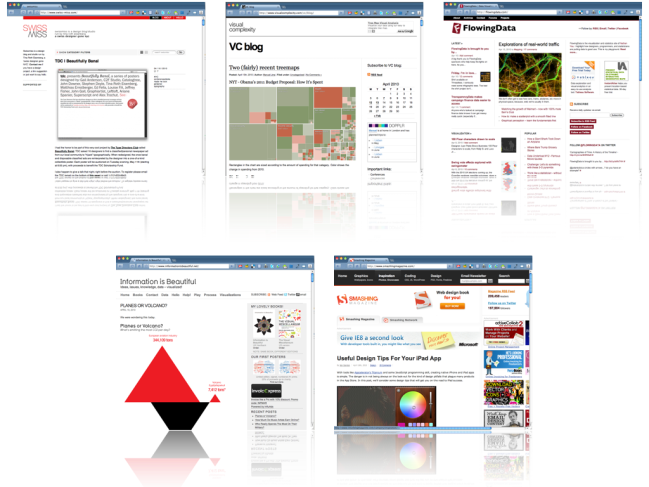
Recommended Design-related blogs

Welcome back!
Feel free to suggest topics for me to write about using the Suggestions? tab to the right or use Formspring to ask me random stuff. Check Doug's FAQ first!

Introduction

A couple of people in the last month have asked if I’d share which blogs I read regularly. It’s a logical follow-up, I suppose, to my Things I Learned This Week posts. If I used an RSS reader this would be very easy: I’d just export my subscriptions as an OPML file. Readers could then download this and import it into their RSS reader.

But, er… I don’t any more. I made a conscious and deliberate switch to subscribing to blogs by email – either through author-provided functionality or RSS >> Email courtesy of Reblinks. Which makes things slightly more difficult (and this post necessary).

A non-design blog I subscribe to, Alan Levine’s excellent CogDogBlog, featured a post yesterday that discussed the importance of both online and offline filtering. That’s because, as Clay Shirky is always at pains to point out, it’s not information overload, it’s filter failure. Whilst serendipity and specific niche interest are both important things that shouldn’t be neglected, it’s also important to identify people who are awesome filters of information, links and connections.

The Blogs

The following blogs are design-related but also have a community element; they serve as a hub for a wider bunch of people. As such, you’ll find added value in trawling the comments section as much as the posts themselves. :-D

  1. FlowingData – I really enjoy Nathan Yau’s blog and find his simple and straightforward guides extremely useful as a beginner!
  2. Smashing Magazine – Design in the widest sense. They often have wonderful posts showcasing the best and brighest stuff on the intertubes in a given area. They also have (downloadable) monthly wallpaper contests – such as this one for April 2010.
  3. swissmiss – Tina Roth Eisenberg is a prolific blogger, to the extent that she only took a few days off from blogging after giving birth and named her baby after consulting her readers! I love the quirky stuff she posts and it always makes me smile. :-)
  4. Information is Beautiful – David McCandless not only has a regular section in the Guardian but has written books. Awesome visualizations and infographics!
  5. Visual Complexity – The diversity of visualizations and design on this blog is truly stunning.

More?

Looking for more design blog goodness? Try this ‘Top 50 design blogs’ and, of course, AllTop’s Design section. :-p

Posted: April 17th, 2010
Categories: design
Tags: , , , , ,
Comments: View Comments.

My digital reading workflow.

My digital reading workflow

The above is my first effort at visualizing how I approach reading stuff online. You’ll notice that it all ends up back at my delicious account. That’s because it’s important that I can re-find stuff that I come across, even if only briefly.

Down the left is the information I glean from blogs and news sites. I subscribe to these by email nowadays as I realised that the problem was with having to go somewhere else to read stuff other than my inbox. It’s sent to me, I read it and then bookmark it if important.

Down the right is the stuff I read on-the-go through my iPhone and Tweetie, my Twitter client of choice. The great thing about Tweetie is that it has Instapaper integration. If you haven’t come across Instapaper yet, I really do recommend it for providing a clean, stripped down version of text you want to read later. Once I’ve read the article/information on Instapaper I bookmark if I deem it worthy.

In the centre is my Twitter favourites. It’s really easy, using Tweetdeck (my desktop Twitter client of choice) to ‘favourite’ tweets. I then go back through these at http://twitter.com/dajbelshaw/favourites periodically and bookmark most of them.

So that’s how I roll. What about you?

Posted: December 18th, 2009
Categories: Technology
Tags: , , , , , , , , , , ,
Comments: View Comments.

My presentation @ TeachMeet Midlands 2009

TeachMeet Midlands 2009

This evening I’ll be attending TeachMeet Midlands 2009 at the National College for School Leadership in Nottingham. If you’ve never heard of a TeachMeet before, they’re based around the idea of an unconference, ‘facilitated, participant-driven conference centered around a theme or purpose.’ (Wikipedia) I’ve been to a couple before – both of which were additions to the BETT Show – and they’re great events. There’s a fantastic buzz around the place, people passionate about what they do, and it’s a wonderful way to not only meet up with people you’ve only talked to online, but to come across new faces as well! :-)

My (micro)presentation

I’ve signed up on the TeachMeet wiki to do a 7-minute micropresentation. Initially, I was going to talk about my role this year as E-Learning Staff Tutor and a bit about my Ed.D. on digital literacy. However, TeachMeets should be a lot more focused on classroom practice, so I’ve decided to instead talk about what I’ve been doing with my Year 10 History class.

This year I saw my having a new, fairly able GCSE History class as a good opportunity to try out some new methods and approaches to the course. As students at my school now have four lessons of their option subject per week instead of three, I decided to have one of them timetabled in an ICT suite. The room I was allocated has tiered seating and laptops, which was even better! :-p

After looking at various options, I decided to use Posterous for their homework blogs. Reasons for this include:

  • Blog posts can be written by email.
  • It deals with media in an ‘intelligent’ way (e.g. using Scribd to embed documents, making slideshows out of images)
  • Avatars allow for personalization.

I set almost no homework apart from on their blogs. This means that on a Friday they start an activity using (usually) a Web 2.0 service and then add it to their blog via embedding or linking. The only problem with this has been Posterous not supporting iFrames, meaning that Google Docs, for example have to be exported to PDF and then uploaded. Students are used to this now and it doesn’t really affect their workflow.

Examples of student work

Links to all blogs can be found at http://mrbelshaw.posterous.com

Student feedback

I should, perhaps, have asked for parental permission to video students’ opinions about this approach. From what they tell me, they greatly enjoy working on their blogs. In fact, a Geography teacher at school has hijacked one of my students’ blogs so she does work for both History and Geography on it! I think they appreciate the following things:

  • Presentation (a lot easier, especially for boys, to produce good-looking work)
  • Multimedia (they’re not looking at paper-based stuff all the time)
  • Collaboration (they get to work with others whilst still having ‘ownership’ of the final product on their blogs)

It’s a system that I’d definitely recommend and I shall be using in future! :-D

Short URL for this post (for Twitter, etc.) = http://bit.ly/4jD6V

Posted: May 15th, 2009
Categories: Education
Tags: , , , , , , , , , ,
Comments: View Comments.

Podcasting: a 3-step guide

Podcasting overview (2)

Some members staff were unable to make some or all of the E-Learning sessions I put on regarding podcasting. I’m therefore re-running them this half-term over the next three weeks.

Posted: March 9th, 2009
Categories: Podcasting
Tags: , , , , , ,
Comments: View Comments.

Living offline

Apologies for the lack of updates this week. Normal service was to be resumed yesterday after returning from a school trip to the WWI battlefields in France/Belgium (http://battlefields.posterous.com). However, Orange, in their infinite wisdom, cut off our Internet connection earlier this week instead of migrating it from my mobile phone contract to Hannah’s. :-o

I’m obviously meant to have a break. My Ed.D. supervisor’s ill so couldn’t meet up with me today, Nick Dennis isn’t able to come up to collaborate on some work we’re doing for a publisher and, finally, it would seem that my house is no longer in a 3G area.

I’m writing this using the WordPress iPhone application. Whilst it’s fine for short text entry, it’s not really able to create my usual sort of blog posts. It would seem that this is a blessing in disguise. I’ll *have* to slow down this half-term! :-)

Orange have promised to have us up-and-running by the end of next week. In the meantime, check out the battlefields blog (see link above) and the work I’ve been doing in my first half-term as E-Learning Staff Tutor at my school (http://elearnr.edublogs.org) :-p

Posted: October 29th, 2008
Categories: Everything Else
Tags: , ,
Comments: View Comments.

3 ways to prevent being ‘unfollowed’ on Twitter

Some people reading the title of this blog post may claim not to be bothered when they’re ‘unfollowed’ on Twitter, FriendFeed, etc.  I don’t believe them.*  ;-)

Most people on Twitter also have a blog. The reason you have a blog rather than write in a personal diary is to share your ideas with the world. You’d like to influence others in some way.

As a result, whether you like it or not, if you’ve got a blog you’re in the marketing business. You are (potentially) a global micro-brand.

All this sounds a bit business-like, especially for an educator with a professed aim to change the education system for the better. But, as I have blogged about recently, our ideas gaining acceptance is one way to achieve a sort of immortality. And if we do want to change the education system, we need to influence as many people as possible! :-D

So yes, you do need to be concerned when people ‘unfollow’ you on Twitter. One or two may not be a problem, but if there’s somewhat of an exodus, it means that they’re not getting what they thought you’d be delivering. Let’s see how we can make sure that state of affairs doesn’t obtain…

1. Speak in full sentences

When I teach lessons that involve students answering questions, I stress the importance of making sure they don’t start their answer to a question with ‘because’, and that they explain the context. Otherwise, when they come to revise, they won’t ‘get it’. Similarly with Twitter, you’re not just having a conversation with another individual – people who are following you are also listening. Don’t say ‘it’ – say what you mean and link to what you’re talking about (if relevant) – and in every tweet involved.

2. ‘Direct message’ people more

Just because someone’s used an @ reply to you (e.g. @dajbelshaw: my interesting message) doesn’t mean you have to do likewise to them. If what you’re going to say is unlikely to interest others apart from that individual, send them a direct message. Just be sure to double-check that you’re following them as well, otherwise it could be slightly embarrassing. I talk from experience… :-o

3. Don’t binge-tweet

I use FriendFeed as well as Twitter. FriendFeed summarises when someone sends more than one tweet in quick succession. Yesterday, someone I follow posted 25 messages in quick succession. When you’re following hundreds of people, that’s too much to handle. Be focused.

I’m always very aware that my tweets are one of the first things you see when you visit dougbelshaw.com. That means I try to keep the most recent tweet fairly interesting and relevant to both Twitter followers and visitors to my site. If I post a reply which may be useful to others but fairly geeky, I try to follow it up quickly with something of greater relevance.

These ideas may not work for everyone, but they work for me. What do you use Twitter for? What are your tips for using it?

* This post came about after a discussion about a new service called Qwitter that emails you when someone stops following you on Twitter.

(Image by Mykl Roventine @ Flickr)

Reblog this post [with Zemanta]
Posted: October 20th, 2008
Categories: Technology
Tags: , , , , , ,
Comments: View Comments.

Creating a homework blog in 3 simple steps using email

Posterous has been mentioned a couple of times before on this blog. First, Phil Rowland set up a blog using the service for his BTEC Sport students (although he’s now extended it to include all his PE groups). Next, our librarian, Angie Dickson, set one up. Both have been impressed by how easy Posterous is to use.

Here’s how to get started (taken directly from Posterous‘ official guide):

Yep, that’s it! It really is very easy. No signups, and pretty much everything can be done via email. You can, of course, create a blog post via logging into the site itself, but most of the people I’ve spoken to about it like the ability to create them by email. :-)

Anything that you attach to an email to Posterous will be dealt with ‘intelligently’ and added to the blog post. For example, here’s an email I sent to my Posterous blog:

 (click to enlarge)

and here’s how it turned out:

  (click to enlarge)

It really couldn’t be any easier to set up a blog! The only things I would recommend you take care over are:

  • Set the name of your blog, it’s address, and decide who can comment: login to your Posterous account and then click on ‘Manage’ at the top right-hand corner of your blog. Clicking on ‘Edit my posterous’ allows you to change the site name, where it is on the Internet (e.g. mrbelshaw.posterous.com and choose who is allowed to comment on your blog posts.
  • Set an avatar: an avatar is a small icon representing you on the Internet. I always use my little South Park character. There are many sites you can use to create something similar, including faceyourmanga.com, a South Park character generator (unfortunately blocked on our school network), and the Simpsons character generator on the SimpsonsMovie.com site! :-)
  • Add some information about yourself: it doesn’t need to be much, but students and interested visitors need to know they’ve found the right blog and not someone else with the same name as you…

Here’s the Posterous-powered blogs so far at our school. I hope to add many more in the near future!

  1. Mr Belshaw (History – also links to GCSE History student blogs)
  2. Mr Rowland (PE)
  3. Mrs Dickson (library)
Posted: September 22nd, 2008
Categories: blogging
Tags: , , ,
Comments: View Comments.

Librarian blogs and social networks

Angie Dickson, our new librarian, is an fan of the PE blog Phil Rowland set up for this academic year and wants to set up her own. Not only can she use this blog to communicate with students at our school, but with librarians and heads of information services worldwide!

Here’s some examples of some great (newbie-friendly) blogs in the field:

There are also some social networks powered by Ning related to libraries and information services:

Finally, there’s a great website called LibWorm that’s a search engine just for librarians! :-)

(image from The Read/Write Web: Social Software and Libraries)

Posted: September 16th, 2008
Categories: Library, blogging
Tags: , , ,
Comments: View Comments.

“Toto, I have a feeling we are not in Kansas anymore!” (or, How to get started in the Edublogosphere…)

Wizard of Oz

I’ve been contacted by four different postgraduate researchers in the last two weeks. It’s getting to the stage where I’m considering setting up a new website/discussion space! A couple of them just wanted permission to use some of my stuff in their theses, one is already a member of the Edublogosphere, but one asked a very pertinent question:

My stumbling across some of your postings last night was my first trip in the edublogosphere. What else is going on out there?

As you can imagine, I hardly knew where to start! As I like to reply to emails ASAP, I replied thus:

  • Find some blogs to read. My Google Reader shared items might be a good place to start. Also try the big names in the edublogosphere – search for Stephen Downes, Will Richardson, Vicki Davis, Ewan McIntosh, and Dave Warlick. :-)
  • Get yourself a Google account and use Google Reader to subscribe to the RSS feeds of blogs (don’t know how? click here)
  • Start using Twitter. At first you’ll think “What on earth…?”. After a while you’ll find it indispensible.
  • Start blogging yourself. Doesn’t matter what, but start making links with people. It’s the conversation that counts! Try edublogs to get you started. :-D

There’s a Hebrew proverb that I’m sure almost every educator will have heard before: “Do not confine your children to your learning, for they were born in a different time.” The same could be said of the Edublogosphere. I can hardly recommend that people start by using the same tools I did when things have moved on so much in the last 3-4 years! What would YOU recommend?

This Sunday, EdTechRoundup will be discussing just this issue – how to get started in the Edublogosphere – from 7.45pm onwards. Please do join us and give your input. The session will be recorded and go out as a podcast.

If you can’t make it, or just want to get the conversation going before then, please add your comment below! :-p

Some web-hosting advice, please…

Last month when I opened up our credit card statement, I looked with horror at the amount I was being charged for webhosting. It said that MediaTemple, my current web hosts for this blog, learning.mrbelshaw.co.uk, edte.ch and historyshareforum.com were charging me almost £20 per month for the privilege. This, apparently, is due to the ‘amount of MySQL activity’ on my account. :-o

Last summer, I transferred from Bluehost – with whom I’d been very happy – due to MediaTemple’s well-publicised ‘Grid Hosting’ and their ability to host domain names such as .ch (needed for edte.ch). Now, however, I find that my websites take longer to load, their customer service is below average, and they’re over-charging me.

I’d love to simply go back to Bluehost. That’s not really an option, however, due to their inability to host .ch domains. I had a look at going with HP-backed and much-advertised One.com, but they don’t allow ‘download-related’ sites – historyshareforum.com is for the sharing and downloading of resources.

So I’d like your recommendations please. My criteria are:

  • Good value (i.e. reasonably cheap!)
  • Good customer support (quick response time)
  • Support for a wide range of domain extensions

Ideally, I’d also like the servers to be based in the UK. It makes fast loading times of the websites for the majority of my visitors more likely, you see… :-D

Image credit: The Web that is Us by ecstaticist @ Flickr

Posted: May 24th, 2008
Categories: Everything Else
Tags: , , , , , ,
Comments: View Comments.
Work with me
uncopyrighted
Bluehost FTW!